
Cloud service types
IaaS, PaaS and SaaS, the three core cloud service types and their responsibility/flexibility trade-offs.
The "as a service" marketing problem
Almost anything can be branded "___ as a Service" (Identity as a Service, Desktop as a Service, Disaster Recovery as a Service...), mostly marketing speak that makes it hard to tell what a product actually does or who's responsible for what.
Underneath the branding, there are only three core cloud service types with clear, defined boundaries (and they're required knowledge for the AZ‑900 exam):
- IaaS: Infrastructure as a Service
- PaaS: Platform as a Service
- SaaS: Software as a Service
The core trade-off: flexibility vs. responsibility
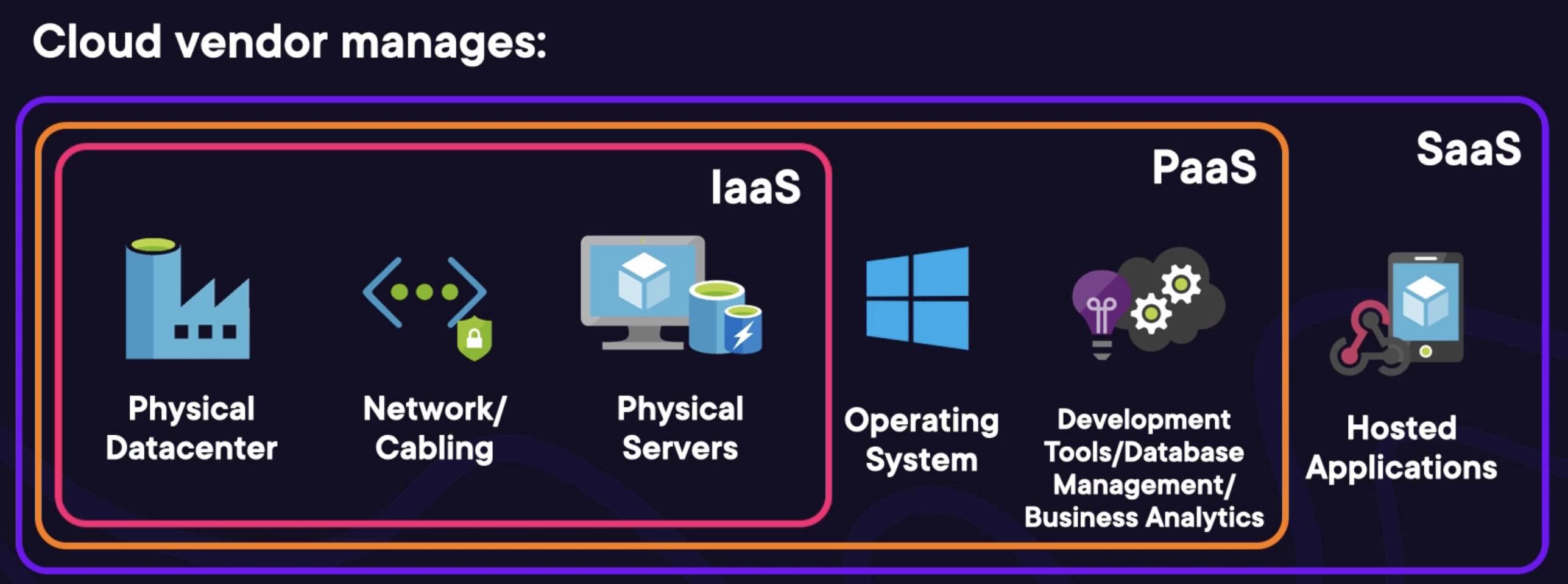
The differences between the three come down to one axis: the more control you want, the more you're responsible for. As you move from IaaS → PaaS → SaaS, the vendor takes on progressively more of the stack:
- IaaS: vendor handles the physical layer only, data center, network cabling, physical servers.
- PaaS: vendor also takes on OS management, software licensing, dev tools, DB management, business analytics, and more.
- SaaS: vendor hosts the entire functional application, you just use it.
Each type is a strict superset of the one before it, what the vendor manages under PaaS includes everything it manages under IaaS, plus more; SaaS includes everything under PaaS, plus the app itself:
IaaS: basic computing infrastructure
- Essentially virtual machines, the greatest amount of control and customization of the three.
- Trade-off: significantly more to manage yourself.
- Pricing: pay for what you allocate.
PaaS: prepackaged solutions
- Prepackaged cloud solutions fulfilling a specific requirement for app/solution deployment.
- Less control and customization than IaaS, but substantially less management overhead.
- Pricing: pay for what you use/consume.
SaaS: ready-to-use applications
- Fully hosted, ready-to-use applications, focus is on the end-user experience, not building your own software.
- Least control and customization, but also the least management overhead of the three.
- Pricing: pay for what you subscribe to.
Summary
Choosing between IaaS, PaaS and SaaS comes down to how much responsibility and flexibility you want or need:
- IaaS: most control, most management, pay for what you allocate.
- PaaS: moderate control, moderate management, pay for what you use.
- SaaS: least control, least management, pay for what you subscribe to.
Each maps onto the Shared Responsibility model, the further right you move (IaaS → PaaS → SaaS), the more of the responsibility shifts from you to the cloud vendor.
IaaS
IaaS in detail: virtual machines
Definition: pay-as-you-go managed IT infrastructure. IaaS is the fundamental building block underneath every other cloud service type, PaaS, SaaS, and any other "___ as a Service" all run on IaaS beneath the hood. In practice, IaaS is essentially synonymous with virtual machines (VMs), the infrastructure also includes their networking and operating systems, but VMs are the main focus.
What a VM is
A VM is simply a virtual version of a physical computer, with the same required components:
- CPU and memory configuration
- A disk hosting the OS and data
- Networking configuration (internal + public internet)
- An operating system, typically Windows or Linux, sometimes Mac
- Network access controls (firewalls, etc.)
The only thing missing compared to a physical computer is physical access (e.g. physical ports).
Behind the scenes: hypervisors
- VMs run on a hypervisor: a physical server whose sole job is to host multiple individual VMs. This applies equally to cloud and on-premises data centers.
- The vendor manages the hypervisor itself; you never interact with its host OS directly, only with your own VM(s) on it.
- Common hypervisor software: Hyper-V (Microsoft) and VMware.
- Isolation: VMs on the same hypervisor, even ones belonging to different organizations, have no knowledge of each other. Each VM behaves as if it's the only one that exists.
- You get no control over which specific physical hypervisor your VM runs on (beyond region), and it doesn't matter, that's part of what the vendor manages for you.
What VMs can do
Outside of needing physical access, a VM has all the same capabilities as a physical computer, any software that runs on a physical machine runs on a VM. This is also what "instant server provisioning" refers to as a cloud benefit: spinning up a new VM on demand.
Responsibility split
Vendor manages the physical layer: hypervisors, network cabling, data center building access. As the customer, you're responsible for nearly everything else, the direct consequence of the control-equals-responsibility trade-off:
- OS and software updates on the VM
- User access management
- Network access control (firewalls)
If managing all of this isn't wanted, that's the case for PaaS instead.
IaaS summary
IaaS = managed IT infrastructure, delivered as virtual machines, virtualized versions of physical computers with full capability except physical access. Full control and maximum flexibility of the three service types, at the cost of the most responsibility. Less responsibility wanted → look at PaaS.
TBC